



×
单选题

316.下列哪项命令可以用来检查 PPPoE 客户端的会话状态?
A
display ip interface brief
B
display pppoe-client session packet
C
display pppoe-client session summary
D
display current-configuration
答案解析
正确答案:C
解析:
**正确答案:C**
**解析:**
在华为或 H3C 等网络设备的 VRP 系统中,检查 PPPoE(Point-to-Point Protocol over Ethernet)客户端会话状态常用的命令如下:
1. **选项 C `display pppoe-client session summary`**:
* 该命令用于显示 PPPoE 客户端会话的**摘要信息**。
* 输出内容通常包括会话 ID(Session ID)、状态(State,如 Active、PADT Sent 等)、接口名称、远端 MAC 地址等关键信息。
* 这是排查 PPPoE 拨号是否成功、会话是否正常建立的最直接且常用的命令。因此,它是检查会话状态的最佳选择。
2. **选项 A `display ip interface brief`**:
* 该命令用于查看接口 IP 地址的配置情况和接口的物理/协议状态(Up/Down)。
* 虽然如果 PPPoE 拨号成功,对应的 Dialer 接口会处于 Up 状态并获取到 IP,但该命令无法提供 PPPoE 协议层面的详细会话信息(如 Session ID、协商阶段等),因此不是专门用来检查 PPPoE 会话状态的命令。
3. **选项 B `display pppoe-client session packet`**:
* 该命令通常用于显示 PPPoE 会话的**报文统计信息**或抓包详情(具体取决于设备版本和视图),主要用于调试报文交互过程,而不是直观地查看当前的会话连接状态。对于日常的状态检查,`summary` 更为标准和常用。
4. **选项 D `display current-configuration`**:
* 该命令用于显示设备当前运行的配置内容。
* 它只能看到 PPPoE 的配置参数(如账号、密码、绑定接口等),无法反映实时的运行状态或会话是否建立成功。
**总结:**
要检查 PPPoE 客户端的会话是否建立以及当前的状态,应使用 **`display pppoe-client session summary`**。
相关知识点:
查PPPoE会话,用display pppoe-client session summary
题目纠错
华为数通工程师HCIA题库
相关题目
单选题
485.如下图所示网络, 交换机配置信息如下, 下列说法中正确的有?Interface GigabitEthernet0/0/1Port hybrid pvid vlan 20Port hybrid untagged vlan 10 20Interface GigabitEtherneto/0/2Port hybrid pvid vlan 10Port hybrid untagged vlan 10 20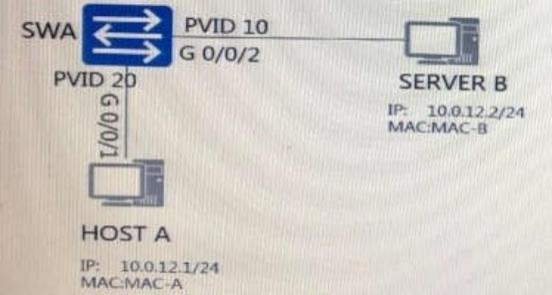
单选题
484.SWA 和 SWB 运行 RSTP 协议, 下列说法正确的有?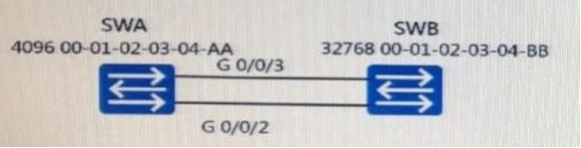
单选题
483.现有交换机 MAC 地址表如下, 交换机收到一个源 MAC 地址为 5489-9811-0b49, 目的 MAC 为 5489-989d-1d30 的数据帧, 下列说法正确的有?
单选题
482.如图所示的网络, 通过以下哪些都置可以实现主机 A 和主机 B 不能相互通信?
单选题
481.参考以下 DHCP 流程图, 以下说法正确的是 () 。 
单选题
480.在一 台路由器上配置 OSPF 时, 必须手动进行的配置有 ( ) 。
单选题
479.OSPF 协议在以下哪种网络类型中需要选举 DR 和 BDR?
单选题
478.关于静态 MAC 地址表说法正确的是?
单选题
477.关于黑洞 MAC 地址表说法正确的是?
单选题
476.查询设备 OSPF 协议的配置信息, 可以使用下列哪些命令?